
How to Trade Crypto: Buy, Sell, and Earn with Take Profit
Crypto trading is how people try to earn from price moves: buy a token when the setup looks strong, then sell when the target is hit. On Solana that can happen fast — which is why a clear buy flow and a clear sell plan matter more than guessing charts alone.
JupLite is built as a practical place to trade: AI helps you review a token before you buy, Jupiter-powered swaps keep fees low, and automatic Take Profit orders let you set a sell target so you do not have to watch the screen all day.
This guide shows exactly how to use JupLite — how to buy step by step, how to sell manually, and why Take Profit automatic orders are the key tool when you want a chance to lock gains if the market moves your way. Markets involve risk; nothing here guarantees profit.
What is crypto trading?
Crypto trading means buying and selling digital assets — SOL, USDC pairs, meme coins, and other Solana tokens — to try to earn from price changes. A trade has two halves: the buy (entry) and the sell (exit). Many beginners learn how to buy, then forget to plan how to sell.
Trading is different from holding forever. You think about timing, entry size, a sell target, liquidity, and whether the setup still makes sense. Beginners do not need a complex desk on day one — they need a repeatable buy and sell process.
Start with three questions before every trade:
- What token am I buying, and why now?
- Where do I plan to sell (target or Take Profit)?
- What liquidity, volume, and risk signals support the decision?
When entry and exit are both clear, trading becomes a process — not a gamble on hope.
Why beginners need a simple buy-and-sell process
Solana moves quickly. Tokens can pump and dump while you are away from the phone. Without a process, it is easy to buy late, panic-sell, or never sell at all and give back unrealized gains.
A beginner-friendly process on JupLite should include:
- token discovery (search, screener, or a mint you trust)
- AI analysis before you buy
- liquidity and volume review
- a clear buy size you can afford to risk
- a sell plan — manual sell or automatic Take Profit
- wallet confirmation only when you are ready
JupLite connects these steps in one flow: review → buy on Swap / Pro → set Take Profit so an automatic order can sell for you when your target is reached (subject to market, liquidity, and Jupiter Trigger rules).
Why automatic Take Profit orders matter
Buying is only half of earning. If price moves in your favor and you are offline, a manual sell may never happen. An automatic Take Profit order is a sell order with a price target you choose in advance — Jupiter Trigger can watch the market and sell into USDC, USDT, or SOL when conditions allow, even if the JupLite tab is closed.
That is why Take Profit is the most important sell tool on this page: it turns “I hope I sell in time” into a concrete order. It does not guarantee a fill or net profit — thin liquidity, expiry, or a market that never reaches your target can still stop an order — but it is how disciplined traders prepare to capture upside.
- Set a sell target (+1%…+10% or a custom USD price) right after you buy
- Stay non-custodial — you confirm in your wallet; funds follow Jupiter Trigger rules
- No need to keep the site open after the order is created
- Cancel or return tokens from Active orders when you change your plan
- Review filled history later on Portfolio
The JupLite trading workflow (buy → sell)
Use this six-step loop whenever you want a chance to earn from a Solana move:
Step 1: Choose a token to analyze
Start with a token that has activity or a clear reason to review — trending Solana names, a screener hit, or a mint you already researched.
Step 2: Check market context
Look at liquidity, volume, price movement, and activity. A green chart alone is not enough.
Step 3: Use AI analysis
Run AI analysis for a plain-language read on momentum, risk, and whether the setup deserves a buy.
Step 4: Decide calmly
If the setup does not fit your plan, wait. Skipping a trade is a valid decision.
Step 5: Buy with Swap
Connect your wallet, set the token you pay with and the token you buy, review the quote and fees, then confirm the swap in Phantom, Solflare, or another supported wallet.
Step 6: Sell with Take Profit (automatic order)
Open Take Profit under the terminal, set amount, receive token, target, and expiry, then Create order. This automatic sell is how you prepare to lock a target if price moves up — without staring at the chart.
How to buy crypto on JupLite (step by step)
This is the practical buy path on home Swap or Pro:
- Install and open a Solana wallet (Phantom or Solflare are common).
- Keep a little SOL for network fees, plus USDC or another token you will spend.
- Open JupLite or Pro and connect the wallet.
- Search or paste the mint of the token you want to buy; optionally run AI analysis first.
- In the swap terminal, set the token you pay with (for example USDC) and the token you receive.
- Enter the amount, review the quote, route, and slippage — only continue if the numbers fit your plan.
- Tap swap / confirm and approve the transaction in your wallet.
- When the buy lands, check the balance — then set Take Profit immediately so the sell side is not left to chance.
Need SOL first? See How to Buy Solana. JupLite does not buy with a bank card — you swap from tokens already in your Solana wallet.
How to sell crypto on JupLite
You can sell in two ways: a manual swap now, or an automatic Take Profit order for later. For aiming to earn from a target move, automatic Take Profit is usually the better plan after a buy.
Option A — Sell now (manual swap)
Use this when you want to exit immediately:
- Connect the wallet that holds the token
- In Swap / Pro, set the token you sell as input and USDC, USDT, or SOL as output
- Enter the amount (or MAX), review the quote and fees
- Confirm the swap in your wallet and verify the received balance
Option B — Sell later with automatic Take Profit (recommended)
Use this when you want a chance to earn if price rises to your target without watching the chart. Full steps and screenshots are in the Take Profit section below.
How AI helps before you buy or sell
AI crypto analysis speeds up research. It does not replace you and does not guarantee profit — it organizes momentum, liquidity, volume, and risk so your buy or sell decision is clearer.
A useful AI read can help explain:
- token momentum
- recent market activity
- liquidity situation
- volume strength
- price behavior
- risk context before a buy
- whether a Take Profit target still makes sense
Beginners especially benefit: AI turns raw data into a readable brief before you commit size.
Deeper AI context: Best Crypto Trading AI.
Why Solana is a strong place to trade for opportunity
Solana is one of the most active chains for fast on-chain trading: quick confirmation, usually low fees, and many new tokens. That creates more chances to earn — and more chances to lose if you buy without a sell plan.
JupLite focuses on Solana: AI review, wallet swaps, and Take Profit automatic orders in one place so you can move from idea → buy → scheduled sell without juggling five apps.
Product flow in detail: Solana AI Swap.
Beginner strategy: buy with a plan, sell with Take Profit
Keep the strategy simple and repeatable. Size you can risk, analysis before entry, and an automatic sell target after the buy.
One practical loop:
1. Review active tokens
Prefer tokens with real interest and enough liquidity to exit.
2. Read AI analysis
Use AI to understand the setup before you buy.
3. Check liquidity and volume
Thin pools make both buys and Take Profit fills harder.
4. Buy a comfortable amount
Only size you accept losing if the trade fails.
5. Set Take Profit immediately
Pick +1%…+10% or a USD target and an expiry. This automatic order is your sell plan.
6. Review fills on Portfolio
Learn from what filled, what expired, and what you cancelled.
This habit — buy, then automatic Take Profit — is how you stay positioned to earn when price cooperates, without living on the chart.
Buying Solana before you trade
Many beginners start with SOL for fees and as a base asset. You also need SOL (or another funded token) in a wallet before any JupLite buy.
Wallet path to SOL: How to Buy Solana.
After SOL or USDC is in the wallet, use the buy steps above, then set Take Profit so the sell side is ready.
Habits that protect your chance to earn
Good trading is habits, not luck. You do not need to be an expert — you need a better process than FOMO buys with no exit.
Helpful habits:
- run AI analysis before every buy
- check liquidity and volume, not only price
- set Take Profit after almost every buy
- avoid selling only from panic or social media
- use a size you can sleep on
- cancel or update orders when your plan changes
- review Portfolio history to improve
These habits keep the focus on opportunity plus preparation — the only realistic path to earning over time.
Why JupLite is a strong place to buy, sell, and set Take Profit
JupLite combines AI token review, low-fee Jupiter swaps, and automatic Take Profit in one Solana workflow. That is the point of this page: not theory — a place where you can actually buy, then place a sell order that can work while you are offline.
The product loop:
- find or paste a token
- read AI analysis
- buy with Swap or Pro
- open Take Profit and create an automatic sell order
- track Active orders; history on Portfolio
- confirm every action in your own wallet
Non-custodial by design: JupLite does not hold your funds. AI supports decisions; you approve buys, sells, and Take Profit signatures. No market guarantees profit — but a clearer process is how serious beginners try to earn.
Learn the basics, then practice buy and sell
Understand wallets, SOL, USDC, quotes, liquidity, and Take Profit before sizing up. Structure beats speed.
Guided path: Crypto Trading Certificate.
Learning plus live Take Profit practice on small size is safer than jumping into large buys with no sell order.
Solana Take Profit — how to set an automatic sell order
After you buy or when you already hold a Solana token, open the Take Profit block under the swap terminal and create an automatic sell order with your price target. The order goes to Jupiter Trigger; execution depends on market price, liquidity, and your parameters — not on keeping the JupLite tab open. This is the core sell tool if you want a chance to lock gains when price reaches your level.
Take Profit works on the main swap flow and on Pro. Sell a token you just bought or one already in the wallet. Filled history is on Portfolio.
Swaps aim for low fees via Jupiter routing. Take Profit orders follow Jupiter protocol rules and terms — always review status, cancel when needed, and never assume a guaranteed fill or profit.
What you set in a Take Profit order
These fields match the live form:
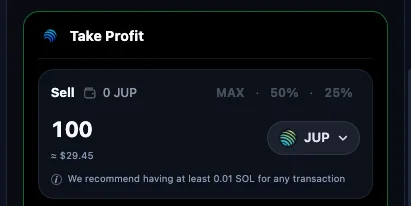
- Sell amount — type a size or use MAX, 50%, or 25% of the sellable balance
- Receive token — USDC, USDT, or SOL
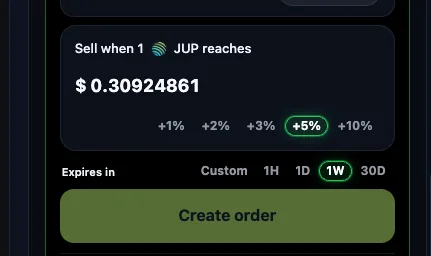
- Target price — USD price, or presets +1%, +2%, +3%, +5%, or +10% above spot
- Expiry — Custom, 1H, 1D, 1W (default), or 30D
- Minimum order size — about $11 notional
How to create a Take Profit sell order (step by step)
Use the real button names from the product:
- Connect a supported Solana wallet (Phantom or Solflare).
- Choose the token in the terminal or search; optionally run AI analysis first.
- Review liquidity, volume, and risk before you buy (or before you sell from an existing balance).
- Buy with Swap, or select a token you already hold — Take Profit can use wallet balances.
- Open the Take Profit block under the terminal (home or Pro).
- Set Sell amount, Receive token, target (+1%…+10% or custom USD), and Expires in.
- Tap Create order and confirm the wallet signatures.
- Find it under Active orders; use Cancel if needed. History is on Portfolio.
Example: automatic sell at +5%
If spot is $1.00 and you tap +5%, Take Profit sets the sell trigger near $1.05. That is a price target at create time — an example of presets, not a promise of return.
A +5% price move is not the same as +5% net profit. Liquidity and fill quality change what you receive. Thin books can miss a fill even when the chart prints your target.
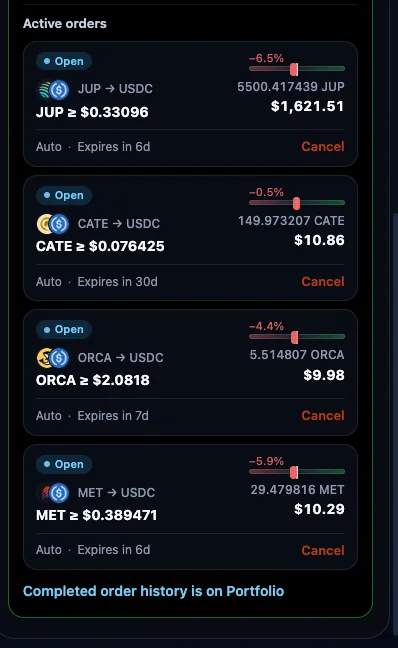
Open Take Profit on Pro, review sells on Portfolio, or start a buy on JupLite Swap.
Take Profit FAQ — automatic sell orders
- What is Take Profit on Solana?
- On JupLite, Take Profit is an automatic sell order for a Solana token. You set a USD target (or % above spot) and expiry; Jupiter Trigger can sell into USDC, USDT, or SOL when conditions allow.
- Do I need to keep JupLite open after creating an order?
- No. After create and confirm, Jupiter’s keeper can execute while the site is closed. You need the wallet again to cancel, return locked tokens, or create a new order.
- Why might an automatic sell not fill?
- Price may never reach the trigger, liquidity may be too thin, the order may expire, or you cancel. A chart print near the target does not guarantee a fill.
- Can I cancel an automatic Take Profit order?
- Yes. Open orders show Cancel. If tokens stay locked after expiry or cancel, use Return tokens (or Complete cancel) and sign in the wallet.
- Does a +5% target guarantee +5% profit?
- No. +5% sets the trigger about 5% above spot. That is a price target, not guaranteed net return. There is no guaranteed profit.
- What happens when the order expires?
- If unfilled, status becomes Expired. Locked tokens stay locked until you Return tokens and sign. Unfilled size is not sold automatically after expiry.
Want yield on SOL? Try staking with JupSOL.
Buy clearly, sell with Take Profit, stay in control
The strongest beginner path on Solana: analyze → buy with a size you accept → place an automatic Take Profit sell → review what happened on Portfolio.
Crypto offers real chances to earn when price moves your way — but only if the sell side is planned. Automatic Take Profit orders are how you prepare that exit without living on the chart.
JupLite is built for that loop on Solana: AI before the buy, fast wallet swaps, and Take Profit automatic orders after. No guaranteed profit — a better process, and a clear place to practice it.
Ready to try? Open Swap, make a small buy when you are prepared, then set Take Profit so the automatic sell is live.