
How to Buy Solana (SOL) with a Wallet
Quick answer: how to buy SOL on JupLite
To buy SOL on JupLite, open JupLite Swap, connect a Solana wallet you control, set the token you pay with (often USDC) and SOL as the token you receive, review the quote and network details on screen, then confirm the swap in your wallet.
You need a Solana wallet, USDC (or another token) already on the Solana network, and usually a small SOL balance for network fees. JupLite is a non-custodial swap interface — it does not buy SOL for you with a bank card.
If you searched for how to buy Solana or how to buy SOL, this guide walks through a wallet-based path on Solana: prepare funds, swap on JupLite, and check the quote before you sign.
SOL is the native token of the Solana blockchain. It can be held or traded, and it is also used to pay small network fees when your wallet sends transactions.
Below: what Solana and SOL are, what you need beforehand, how to buy Solana with USDC step by step, and short FAQ answers. For product context, see What is JupLite.
What is Solana and SOL?
Solana is a fast blockchain used for wallets, swaps, DeFi apps, NFTs, and other on-chain tools. Its native asset is SOL — the balance that appears as SOL in a Solana wallet.
SOL plays two roles for beginners: an asset you can buy or hold, and the token used for network fees when you interact with Solana apps.
Buying SOL is often the first step before exploring JupLite Swap, token analysis, or tools like the screener and portfolio views.
Is SOL the same as Solana?
Solana is the blockchain network. SOL is the native token on that network. People often say “buy Solana” when they mean buy SOL — the asset in your wallet balance.
When guides mention buying a Solana token, they usually mean acquiring SOL or swapping into another SPL token on Solana. This page focuses on getting SOL into your wallet.
What do you need before buying SOL?
A short checklist:
- A Solana wallet (for example Phantom or Solflare)
- USDC or another token on the Solana network in that wallet
- A small amount of SOL for network fees (the swap UI expects SOL for fees — do not assume a USDC-only wallet with zero SOL can complete a swap)
- Time to read the swap quote, slippage, and wallet confirmation screen
Step 1: Choose a Solana wallet
Before buying Solana or using Solana-based tools, you need a wallet. A wallet lets you control assets and approve transactions.
Popular Solana wallets include Phantom and Solflare. They are commonly used for swaps and other Solana apps.
A simple beginner setup:
- install a trusted Solana wallet
- save the recovery phrase carefully
- keep a small amount of SOL for network fees
- learn how to connect and disconnect the wallet
- confirm every transaction only when ready
JupLite is wallet-based and non-custodial. You keep control of the wallet and confirm actions yourself. JupLite does not take custody of your funds.
Step 2: Prepare funds for buying SOL
Many people first get SOL or USDC on an exchange or another platform, then send it to their Solana wallet. For a USDC → SOL swap on JupLite, the USDC must be on the Solana network — not Ethereum, Tron, or another chain.
USDC on Solana is a common way to size a swap in familiar dollar terms. Keep some SOL aside for fees even when you pay with USDC; the product UI reminds users to keep SOL for fees when a route cannot be built without it.
Start with an amount you are comfortable managing. Learn the wallet confirmation flow before larger moves.
How to buy Solana with USDC
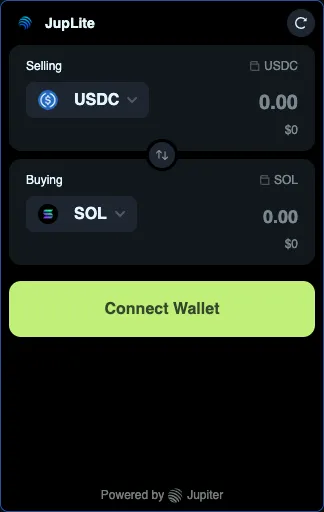
Buying Solana with USDC on JupLite means a wallet swap: you sell USDC on Solana and receive SOL. USDC must already be in your Solana wallet (Solana network). Card checkout is not part of this flow.
Keep a little SOL for network fees even when USDC is your payment token. The live swap UI surfaces fee and route conditions — always read them before you sign. This guide does not list fee amounts or promise the best rate.
Real steps in the swap form:
- Connect your Solana wallet on JupLite Swap (Connect Wallet).
- Confirm you hold USDC on Solana in that same wallet — not USDC on another network.
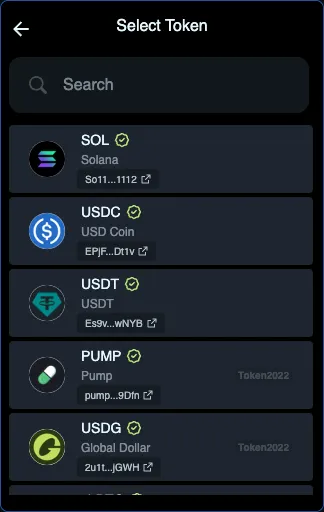
- In Selling, choose USDC; in Buying, choose SOL (search SOL in the token list if needed).
- Enter the USDC amount you want to swap.
- Review the estimated SOL received, route, and any fee or slippage details shown on screen.
- Confirm in your wallet only when the details match what you expect; then check SOL in the wallet or Portfolio.
How Solana swaps work (USDC to SOL and more)
A Solana swap exchanges one token for another through a wallet transaction — for example USDC to SOL, or SOL to another Solana token.
Before you confirm, you should understand:
- which token you are selling
- which token you are buying
- the estimated amount received
- the wallet that will confirm the transaction
- the route shown for the swap
- whether the decision fits your plan
Open JupLite Swap, connect your wallet, and compare the quote on screen before you confirm. Quotes change with markets and liquidity — check the live estimate yourself; this guide does not promise a best rate.
How to buy SOL step by step with JupLite Swap
Practical on-chain path when funds are already in a Solana wallet:
- Open JupLite Swap
- Connect a Solana wallet
- Choose the token you pay with, such as USDC
- Select SOL as the token to receive
- Review the quote, slippage, and any fee details shown before confirmation
- Confirm the swap in your wallet
- Check your SOL balance after the transaction completes
What to check before confirming a swap
Before you approve in Phantom, Solflare, or another wallet:
- Input and output tokens (for example USDC → SOL)
- Estimated amount of SOL you will receive
- Slippage settings and any fee details shown on the confirmation screens
- That the connected wallet address is correct
- That the trade fits your plan — avoid rushed entries
FAQ — buying Solana (SOL)
How do I buy Solana crypto?
Install a Solana wallet, deposit USDC or another token on Solana, keep a little SOL for fees, open JupLite Swap, connect your wallet, select SOL as the receive token, review the quote, and confirm in your wallet.
What is a practical way to buy SOL on-chain?
Swap from USDC (or another token you hold on Solana) through a wallet you control on JupLite Swap, after you compare the live quote and details on screen.
Can I buy SOL with USDC?
Yes. On JupLite Swap, choose USDC as the token you sell and SOL as the token you buy, then confirm in your wallet. USDC must be on Solana.
Do I need a Solana wallet to buy SOL?
Yes. JupLite Swap is non-custodial — you connect a wallet such as Phantom or Solflare and approve each transaction yourself.
Is SOL the same as Solana?
Solana is the network; SOL is its native token. “Buy Solana” usually means buy SOL for your wallet balance.
How do I swap USDC to SOL?
Open JupLite Swap, connect your wallet, set USDC as Selling and SOL as Buying, enter an amount, review slippage and the quote, then confirm in your wallet.
Can I buy small amounts of SOL?
Yes. You can swap a small USDC amount into SOL — useful for learning the flow and topping up fee balance. Still keep enough SOL to pay network fees for the transaction itself.
Why is my SOL not visible in the wallet after a swap?
Wait for confirmation, refresh the wallet, and check the transaction in a Solana explorer. Look for SOL (not a wrapped label). You can also open Portfolio on JupLite. Still missing? Verify you connected the same wallet that signed the swap.
Which network does USDC need to be on?
Solana. USDC on Ethereum, Tron, or another chain will not appear for a Solana swap until you bridge or send Solana-network USDC to your Solana wallet.
Why does the wallet say there is not enough for network fees?
Solana transactions are paid in SOL. If your SOL balance is empty or too low, the wallet or swap UI may block the swap even when you have USDC. Fund a small SOL amount first — JupLite’s swap messaging also reminds users to keep SOL for fees.
Where do I see the SOL I received?
In your connected Solana wallet balance after confirmation, and on JupLite Portfolio. Refresh if the balance is slow to update.
How is a USDC swap different from buying with a bank card?
A USDC → SOL swap moves tokens you already hold on Solana through your wallet. Buying with a bank card is a separate fiat on-ramp (usually on an exchange or wallet buy feature). JupLite Swap covers the on-chain swap step, not card checkout.
Why use JupLite Swap
JupLite Swap is a focused, wallet-based interface for Solana swaps. You connect your wallet, review the quote, and confirm in the wallet — JupLite does not hold your funds.
Pair Swap with the Crypto Trading Certificate path or Best Crypto Trading AI when you want more structure. Always verify the live quote before you sign.
After you buy SOL: optional token review
After SOL is in your wallet, some users explore other Solana tokens. Optional AI analysis on JupLite can summarize activity in plain language before another swap.
For the AI-assisted swap workflow, see Solana AI Swap.
How to trade crypto after buying Solana
Buying SOL is often the first step. Next comes trading with a plan.
Beginners can continue here: How to Trade Crypto for Beginners.
Want yield on SOL? Try staking with JupSOL.
Learning Solana and crypto trading
Solana trading is easier when you understand wallet setup, SOL, USDC on Solana, swap quotes, and how to confirm safely.
Structured learning: Crypto Trading Certificate.
Summary: buy SOL with a clear process
Buying Solana usually means getting SOL into a wallet you control. With SOL and USDC on Solana, you can swap, explore apps, and pay network fees.
Calm path: wallet ready, USDC on Solana, small SOL for fees, quote reviewed, swap confirmed by you, balance checked.
Markets move. Compare the live quote on JupLite Swap and make your own decision — this page does not guarantee a rate or outcome.
Ready when you are: open Swap and walk through a USDC → SOL exchange without rushing.